Product Management with GenAI: What Changes and What Doesn't
Last Updated: April 2026
I’m seeing more and more products that were clearly built with the help of GenAI. They’re full of features that don’t fit well together. Some of the products I’ve seen don’t solve a real problem.
“Even when building is cheap, building the wrong thing is still expensive.”
At Product Camp Ottawa 2026, I asked 3 questions:
- How many of you work in organizations that shipped a feature in the last quarter with AI-generated code? About 1/3 to 1/2 of the people in the room
- How many of those features were built from a hypothesis that had been tested with real users before production code was written? Only 3 people raised their hands, roughly 15% of those who shipped with GenAI
- How many of you have spoken to an actual end user, human to human, in the last month? Nearly half, a good sign. However, this is different from what I see working with teams.
I learned that people at Product Camp are better than most at talking to their users. However, like the rest of the world, they’re struggling to ensure that the right thing is being built. (For Product Owners who want to work through this in depth, our Surviving the AI Tsunami course is an evidence-based, cohort-based course.)
Before GenAI appeared, most teams I met had a bottleneck at Quality Assurance.
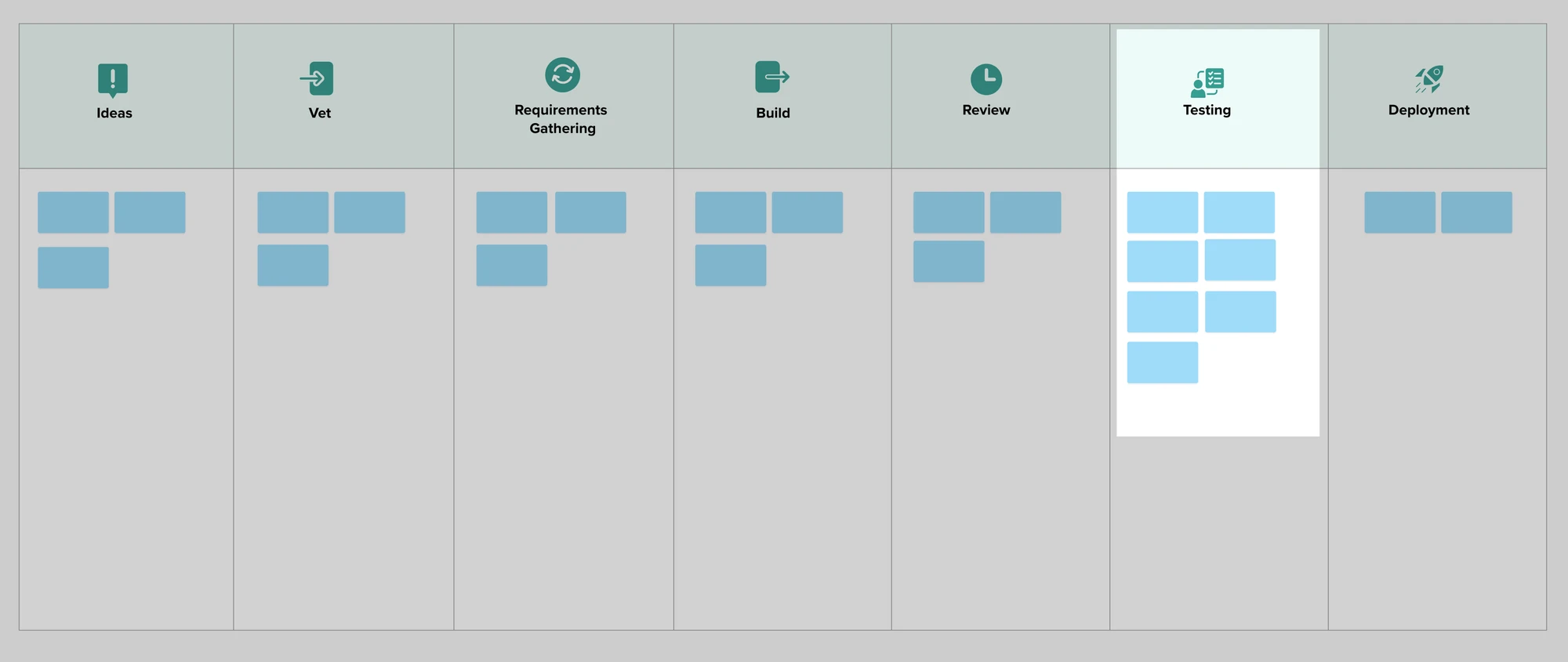
With GenAI, this problem doesn’t change. We still have more features than we can possibly test. If the bottleneck shifts, it’s only because we now have an even worse Code Review problem.
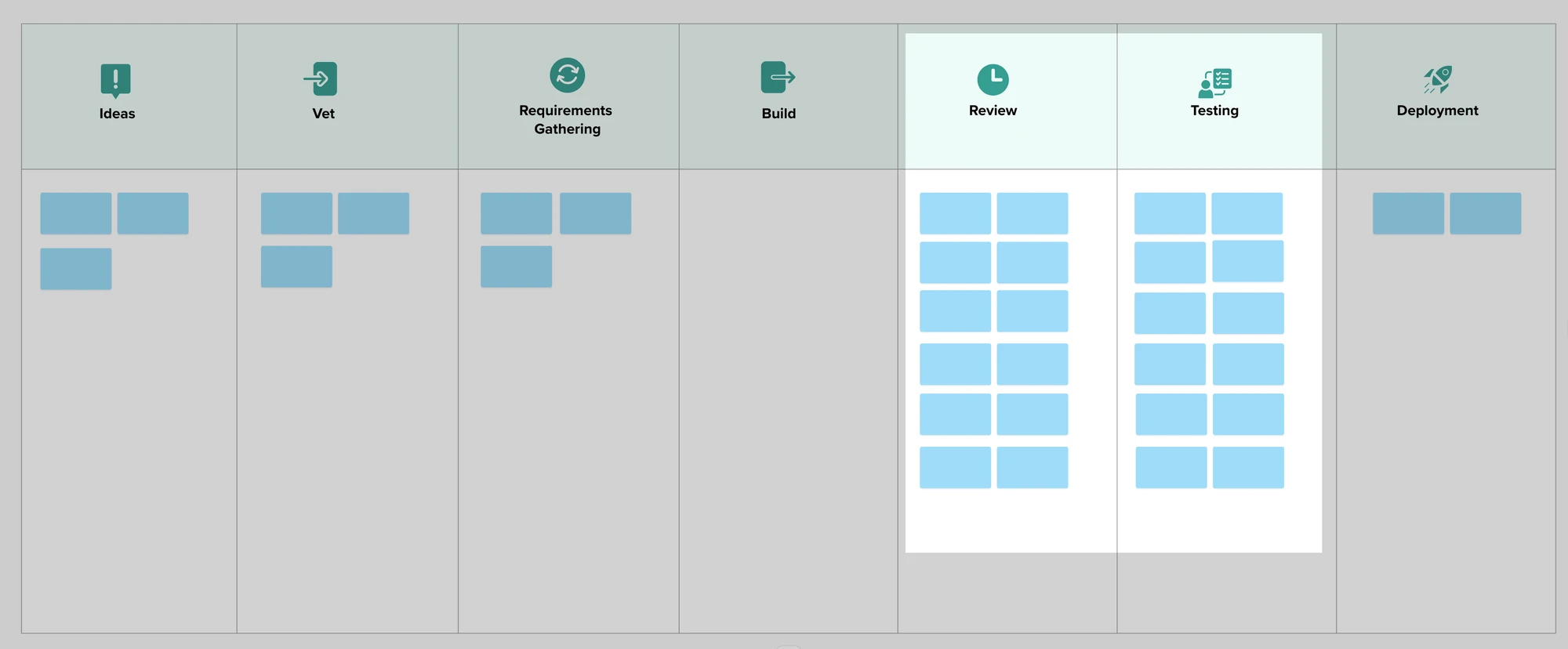
Worse, in many cases, features are getting rejected in the review process or fail in testing. The bottleneck is the place where we don’t have enough people to do the work. Failures discovered here are the most expensive because we wasted the time of the people doing the review and testing. Many of these failures are features that should never have been built or ones with a poor user experience.
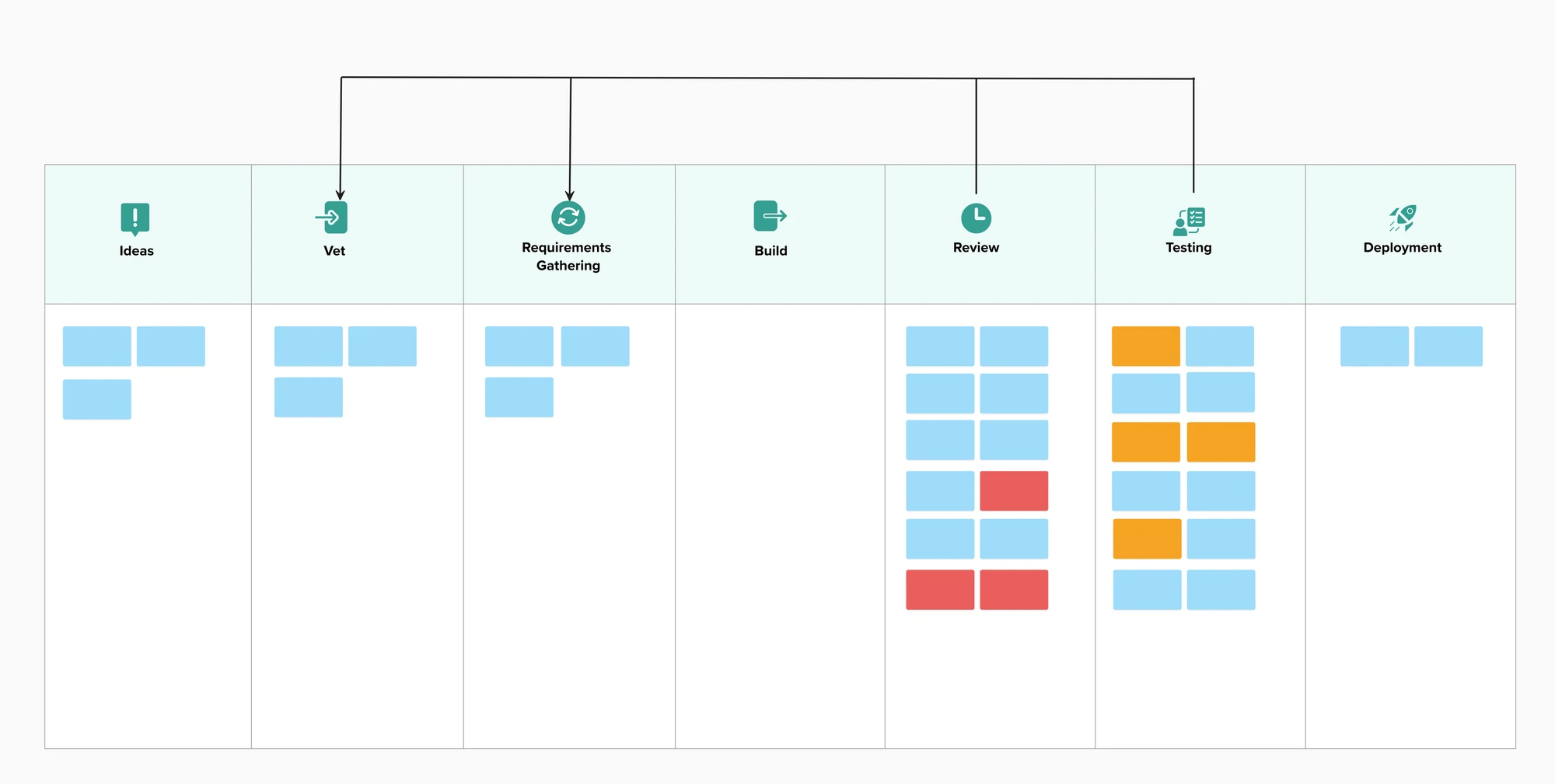
Pressure to use GenAI everywhere it can be used is increasing. No one would suggest that putting more cars on the highway upstream of a bottleneck is a good idea. Yet that is exactly what we’re doing when we generate code. (Classic Theory of Constraints)
You end up with feature bloat that confuses users and feels unfinished. By increasing the number of features, we increase the attack surface and with it the security risk. (The more features we have, the more places an attacker can try to get in.)
“More features, faster, isn’t winning.”
How should Product Management Respond?
Every feature that is built is a hypothesis: “If we build this feature, it will solve a specific problem for a group of users.”
Agile Product Management has long had a set of Discovery tools to help with this:
- Lean Startup: good for testing big hypotheses: should we build this product or feature?
- Lean UX: what version of the feature will solve the problem? (It also puts emphasis on improving usability and user experience)
- Continuous Discovery: what feature(s) are most important right now?
- Behaviour Driven Development: exploring the acceptance criteria for the feature before implementation, so that we build the right thing. Generating code without doing this is a big risk
- Impact Mapping: which feature will have the biggest impact for the business?
Even without GenAI, all of these tools would help a team build the right product for the right users. GenAI makes these tools easier to use, but it’s not magic.
What changes with GenAI?
Across all of these tools, I see that GenAI helps:
- Make prototypes easier to build
- Faster to run Lean Startup type experiments: Wizard of Oz, Fake Door, etc.
- Possible to run multiple experiments at once
- Analysis of large amounts of user data: customer interviews, surveys, analytics, etc.
GenAI also creates some risks:
| Risk | Resolution |
|---|---|
| Prototypes seem polished and complete, so they get mistaken for certainty | Grayscale: build the prototype without colour. No one can mistake it for the real thing. I learned about this over 30 years ago, doing usability work. When we show a UI that looks good, we get feedback about font and colour. When it is deliberately simple, we get far more information about the usability. |
| Outsourcing all analysis to GenAI risks missing important insights and introducing bias and hallucinations1 | Do your own analysis before getting the AI to do one. This way, you’ll have a better understanding of the data. Use the AI as a cross-check for your completed analysis, not to replace it. |
| Using AI agents to simulate real users | Don’t. Talk to real users, even if only three of them, instead. |
| Pressure to go faster means that we skip key validation steps | Remind the people pressuring you that going faster will cost more later, when you need to revert a feature that doesn’t meet a user need or has poor usability. |
The biggest risk is going through the motions: theatre, going through the discovery process without learning. Ask: what did we learn this week that changed our plan? If nothing, it’s theatre.
What doesn’t change?
The need for:
- Customer contact, real world conversations and testing with people
- Collaboration with the team building the product
GenAI speeds up the mechanics of Discovery. Speeding up the mechanics is great, but it means we need to spend more time thinking and learning.
To compete in this market, stop promising to build features just because a stakeholder asked for them. Have a clear testable hypothesis. Building great products still comes down to the same things: talking to real users, running experiments, and listening to the feedback.
What hypothesis will you test next? How will you use GenAI to help? What will you do to offset the risks?
Footnotes
-
AI Generated Personas are a very specific example of this: “Generative AI personas considered harmful? Putting forth twenty challenges of algorithmic user representation in human-computer interaction” Danial Amin, Joni Salminen, Bernard J. Jansen, Joongi Shin, Dae Hyun Kim ↩

Mark Levison
Mark Levison has been helping Scrum teams and organizations with Agile, Scrum and Kanban style approaches since 2001. From certified scrum master training to custom Agile courses, he has helped well over 8,000 individuals, earning him respect and top rated reviews as one of the pioneers within the industry, as well as a raft of certifications from the ScrumAlliance. Mark has been a speaker at various Agile Conferences for more than 20 years, and is a published Scrum author with eBooks as well as articles on InfoQ.com, ScrumAlliance.org and AgileAlliance.org.


