AI-Generated Code Quality and the Challenges we all face
Last Updated: February 2026
Last summer, I wrote about the growing problems with AI-generated code in The Real Cost of AI-Generated Code - It’s Not All It’s Cracked Up To Be. I wrapped it up hopefully: “I’m not saying that GenAI can’t help; I think we will get there.” This week? I dug into 5 papers—academic and vendor—examining AI code quality and its impact on software development. More to come on GenAI’s effects on security, product ownership, and developer identity.
None of them budge the core conclusion here.
Bottom line: It’s going to get worse before it gets better.
Key Findings from 5 Studies
- AI-assisted PRs have 1.7x more issues than human-authored PRs
- Technical debt increases 30-41% after AI tool adoption
- Cognitive complexity increases 39% in agent-assisted repos
- Initial velocity gains disappear in the first few months
- Change failure rate up 30%, incidents per PR up 23.5%
Building the wrong thing faster with AI is not a superpower
There is no way to measure the value of the code we write. All of these papers focus on the number of lines of code and pull requests. This is the only thing they can measure. However, this misses the question: “Did this code deliver the value that was expected?” We’ve all done work where 5000 lines of code were written, but the feature was hardly ever used. On another occasion, 20 lines of code made a huge difference.
Even before GenAI, in most organizations, there was too much code being written. Not enough effort goes into ensuring the feature was worth building in the first place. In addition, these papers only cover security issues in passing; this is another ticking time bomb.
Engineering in the Age of AI 2026 Benchmark Report1
Most of the contents are survey results from 50 engineering leaders - I’m ignoring the opinion-based survey data and focusing only on the hard numbers.
Cortex measured Pull Requests (PRs) and reported percentage differences from Q3-2024 to Q3-2025. The assumption is that AI is responsible for most of the differences: Cycle time up 9%, PRs per author up 20%, incidents per PR up 23.5%, and change failure rate up 30%.
Since they don’t share the data, all we can tell is that with GenAI assistance, people are taking longer to write more PRs — with more incidents and higher failure rates. We can’t tell anything else. How big are the PRs? Do they do what they’re supposed to? Readability? Maintainability? Security?
Given the lack of detail on the data, it’s hard to trust anything beyond the fact that an increase in GenAI usage has led to an increase in the number of PRs, incidents and failure rate.
State of AI vs. Human Code Generation Report2
By contrast, the Code Rabbit paper is clear about the data (stated up front) and its limitations. They examined 470 pull requests: 320 co-authored with AI, 150 likely human-authored. (Caveat — they have an automated review process.)
Headline takeaway: AI-co-authored PRs have 1.7x more issues than human-authored PRs. At the 90th percentile, 2x as many. Correctness 1.75x, Maintainability 1.64x, Security 1.57x, … . The only thing noticeably better: spelling.
We’re using AI to build products that don’t do what they’re supposed to do, are harder to maintain, and have more security issues.
There’s a lot of detail in the Code Rabbit paper; it is worth taking the time to get more detail in each area. Caveat: Even the Code Rabbit paper would be better if they provided a link to the data and statistical analysis.
AI IDEs or Autonomous Agents? Measuring the Impact of Coding Agents on Software Development3
This paper is focused on the impact of Agentic AI (i.e. Claude Code) on software
Coding agents differ from traditional coding assistants in that they work autonomously on larger, multi-file tasks. They break complex requests into steps, execute plans independently, and submit pull requests for review—rather than just offering real-time suggestions while you code.
This paper looks at the agent’s impact on the entire repository, not just how much work an individual contributor creates. In addition, the data comes from open-source code rather than vendor applications.
If your project was started from scratch with the use of Agents, you get a temporary speed up, up until about month 6. More commits (36%) and more lines of code (76%). Remember, more lines of code isn’t a win. If your project was started from scratch by humans, you don’t even get that speed up.
Worse, any repo where an agent does its own independent work over a few months suffers an increase in static analysis warnings (18%) and Cognitive Complexity (39%). Duplication also increased, mirroring what we saw in the GitClear paper last year. (The Real Cost of AI-Generated Code - It’s Not All It’s Cracked Up To Be) For a hands-on demonstration of these quality issues, see our AI Code Generation and the Tennis Kata experiment. For a deeper look at why these problems are structural, see GenAI Code Quality: The Fundamental Flaws and How Bluffing Makes It Worse.
Cognitive Complexity is a measure developed by SonarQube to replace Cyclomatic Complexity4. Its job is to measure how much effort it will take for a person to understand a piece of code. It matters because we will spend more time understanding than writing it. An increase in Cognitive Complexity means less understanding and more time spent doing code reviews. Another way of looking at it, an increase in Cognitive Complexity is an increase in the technical debt.
Complexity Debt Trap5
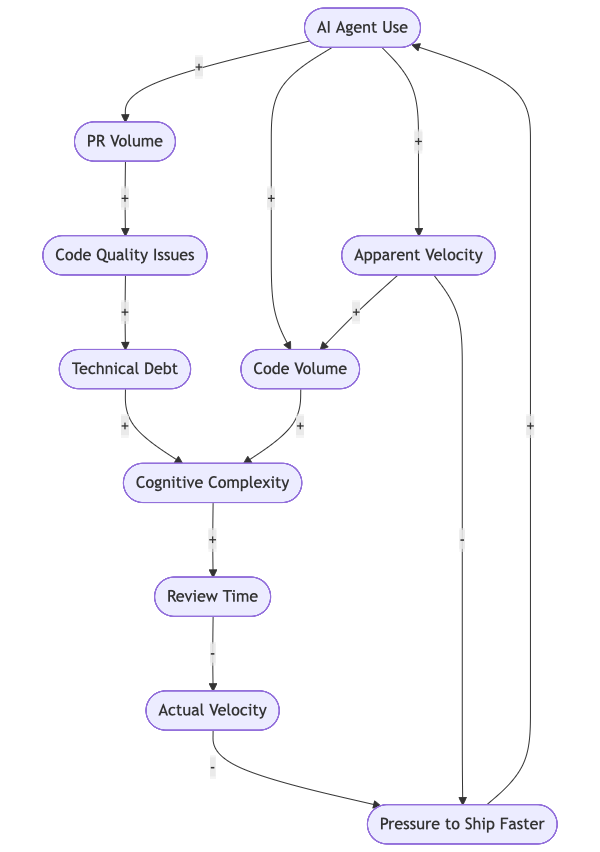
“First, the adoption of Cursor leads to significant, large, but transient velocity increases: Projects experience 3-5x increases in lines added in the first adoption month, but gains dissipate after two months. Concurrently, we observe persistent technical debt accumulation: Static analysis warnings increase by 30% and code complexity increases by 41% post-adoption accord-ing to the Borusyak et al. DiD estimator. Panel GMM models reveal that accumulated technical debt subsequently reduces future velocity, creating a self-reinforcing cycle. Notably, Cursor adoption still leads to significant increases in code complexity, even when models control for project velocity dynamics.”
How I Built a Production App with Claude Code6
Josh Anderson tells the story of how he built a production app with Claude Code. From Lots of features, faster -> more technical debt.
The key takeaway:
At 100,000 lines, I was no longer using AI to code. I was managing an AI that was pretending to code while I did the actual work. Every prompt was a gamble. Would Claude follow the architecture? Would it remember our authentication pattern? Would it keep the same component structure we’ve used for 100 other features? Roll the dice.
My Own Experience
In the past 6 months, I have been using Claude Code to work on a series of projects. One big one, a new app for YourFinancialLaunchpad.com, an Obsidian plugin and many small tools that run on my Mac. For most of it, I’ve been working in Typescript. UI components in Svelte or Astro (for the APR website).
My experience mirrors the findings of the papers and Josh. I have been able to write more code in less time. I also see the maintainability problems. Sometimes the ClaudeCode built me a full OAuth2 flow with refresh tokens when I just needed to hook into an existing system. I often see code that just shouldn’t exist: On one occasion, I was offered a regex solution for parsing and finding a daily journal entry. The problem is that the regex was fragile and unique to my journaling. There are standard approaches, and the AI didn’t look for or ask about the possibility. We shouldn’t even be looking for a filename; instead, ask the system for the journal entries themselves.
For the throwaway projects on my Mac, this is fine. For the real application I’m writing, a lot of effort is needed to ensure I have the correct acceptance criteria before I let the AI write the code.
What to Take Away from All This?
Think of these tools like a megaphone. They don’t change what you’re saying—they just make it louder.
Key Takeaways
- Run experiments first - Build prototypes and validate assumptions with live end users. Look into Lean Startup and Lean UX for experimentation techniques.
- Keep features small - If you get 1000 lines of code in one go, it wasn’t a small feature, and you can’t possibly review or test it well. Don’t tell me you got another Agent to review the code, that’s a help and it won’t protect you from a critical issue.
- Clarify User Stories and Acceptance Criteria - Look at Example Mapping - Your Secret Weapon for Effective Acceptance Criteria. Acceptance criteria should be the result of human collaboration. Humans create, GenAI acts as a critic.
- Use BDD or TDD - Test cases first, code after. Assume the GenAI tool will generate more code than the tests need.
- Enforce readability and style standards - Strict naming conventions pay off in the long run. Hint: better Claude.md files.
- Strengthen security audits - AI tools don’t prioritize security; you must build it in from the start.
Even with all these precautions, the tools will still have limitations.
Many of these skills: Lean Startup, Product Experimentation, User Stories and even Acceptance Criteria are covered in our Certified Scrum Product Owner workshops.
Deliver Value, not Code
Remember, writing code was never the goal, nor is it the bottleneck. We don’t need more code, faster. We need products that solve real problems and are easy to use and maintain. Security needs to be designed in at the start, not bolted on later.
Footnotes

Mark Levison
Mark Levison has been helping Scrum teams and organizations with Agile, Scrum and Kanban style approaches since 2001. From certified scrum master training to custom Agile courses, he has helped well over 8,000 individuals, earning him respect and top rated reviews as one of the pioneers within the industry, as well as a raft of certifications from the ScrumAlliance. Mark has been a speaker at various Agile Conferences for more than 20 years, and is a published Scrum author with eBooks as well as articles on InfoQ.com, ScrumAlliance.org and AgileAlliance.org.


